What EXIF Metadata Reveals About a Photo (and What Survives Re-Encoding)
A single phone photo carries 26 metadata fields — device, software version, exact GPS coordinates, altitude, even the UTC timestamp. We measured which of them survive the operations people actually do to images. The answer is surprisingly forgiving.
The Problem
Every photo your phone takes is a small database disguised as an image. Besides the pixels, the file stores EXIF metadata: what device took it, which camera app version, when it was taken — and, if location services were on, the GPS coordinates where you were standing, to meter-level precision, plus your altitude.
Send that file "as-is" — by email, as an attachment, in a file transfer — and you send the database with it. The recipient doesn't need anything exotic to read it: browsers' developer tools, free desktop apps, and our own Image Info tool all display it in seconds.
Result 1: What One Photo Says About You
This is the complete metadata inventory of one representative phone photo — every field below is readable by anyone who has the file:
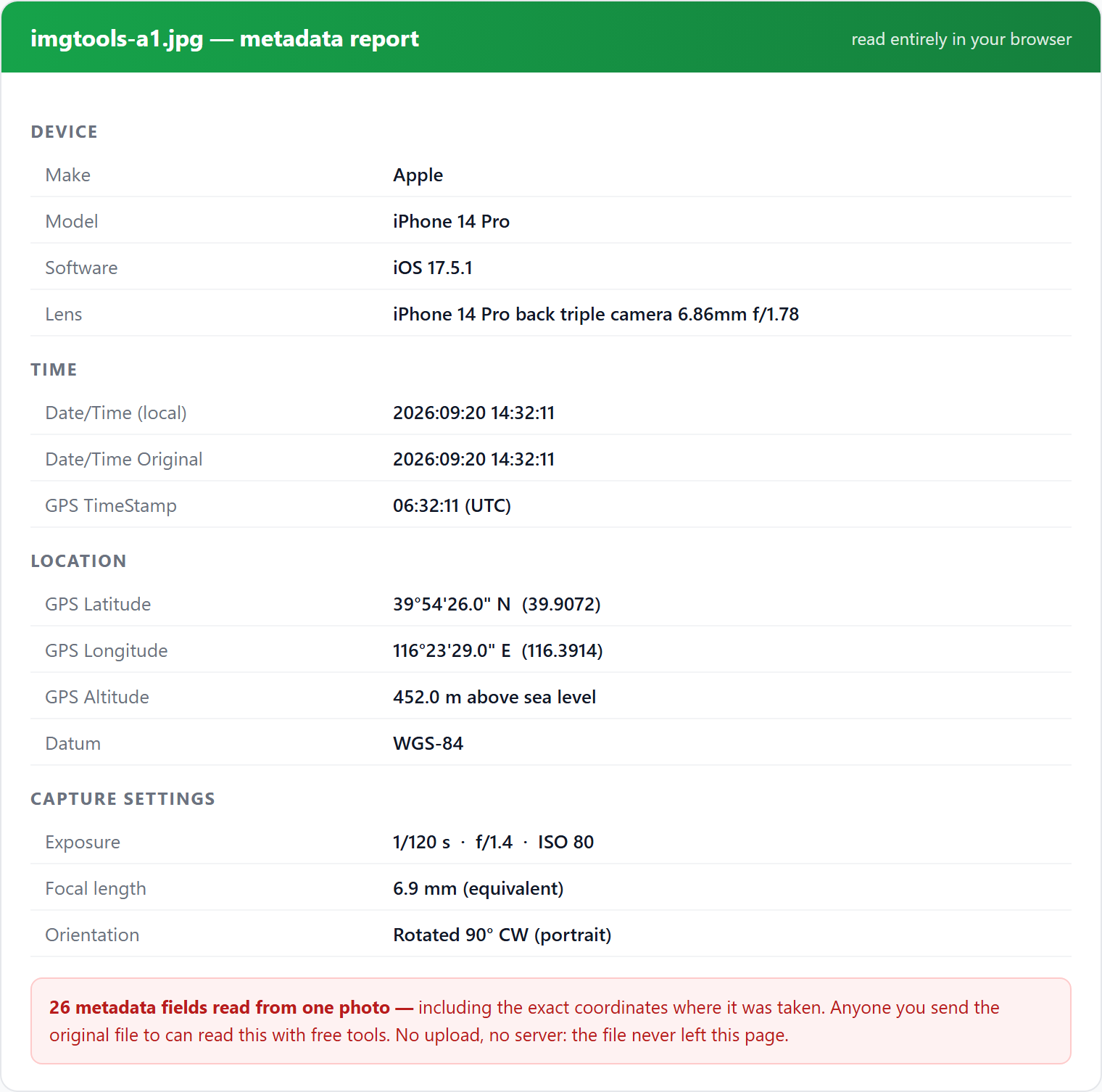
How this test set was built matters, so we'll state it plainly: we constructed these metadata payloads to match the EXIF specification and real device output patterns, on top of our existing test photos — no private photographs were used. The structural question (which fields exist, and which survive processing) doesn't depend on whose photo it is; it depends on the file format and the software doing the processing, which is exactly what we measured.
Method
Baseline file: a JPEG carrying 26 metadata fields across three EXIF structures: the main IFD (device, orientation, time), the Exif sub-IFD (capture settings, original timestamps), and the GPS sub-IFD (coordinates, altitude, datum, UTC time).
Operations tested — what people actually do to images, in two families:
- Browser-based (what our tools do): decode in Chromium 151, draw to an HTML5 canvas, re-encode to JPEG / WebP / PNG with the browser's native encoders.
- Desktop library (what many scripts and some apps do): Pillow decode and re-save — as JPEG with default settings, as JPEG with explicit EXIF passthrough, as PNG, as WebP.
After each operation we counted surviving tags in every IFD, checked the raw file bytes for an EXIF container, and specifically tested the three privacy-critical fields: GPS coordinates, device model, and the original capture timestamp.
Raw data: r4-results.json.
Result 2: The Survival Matrix
| Operation | EXIF container in file | Tags surviving | GPS | Device model | Capture time |
|---|---|---|---|---|---|
| Browser canvas → JPEG | No | 0 | gone | gone | gone |
| Browser canvas → WebP | No | 0 | gone | gone | gone |
| Browser canvas → PNG | No | 0 | gone | gone | gone |
| Pillow re-save → JPEG (default) | No | 0 | gone | gone | gone |
| Pillow re-save → PNG | No | 0 | gone | gone | gone |
| Pillow re-save → WebP | No | 0 | gone | gone | gone |
| Pillow re-save → JPEG (EXIF passed through) | Yes | 26/26 | survives | survives | survives |
Six out of seven common operations strip everything. Any pipeline that decodes the image into raw pixels and re-encodes it — which is what canvas-based tools, most converters, and most compression scripts do — produces a metadata-free file as a side effect of normal operation. No special "privacy mode" required.
The one operation that preserves it is the deliberate one: re-saving with explicit EXIF passthrough. That's what "copy metadata" options in desktop software do, and it's the right default for photography workflows — just wrong for sharing photos of your home.
Result 3: Two Findings Worth Knowing
1. Metadata is cheap — the paranoia costs you almost nothing
The full 26-field payload added 0.6 KB to a ~225 KB photo. Real phone photos often carry an embedded preview thumbnail inside the EXIF block, which can push the overhead to tens of KB — but either way, keeping metadata is not a size decision, it's a sharing decision.
2. The orientation tag is a trap for tool builders
A portrait photo is often stored as 1600×1200 landscape pixels plus an EXIF Orientation tag saying "rotate 90°". Modern Chromium (and our measurements: stored 1600×1200, reported naturalWidth 1200 × naturalHeight 1600) silently applies the rotation on decode — and the canvas re-encode then bakes it into the pixels while dropping the tag. Two consequences:
- For privacy this is good news: the ambiguous tag disappears and the file becomes unambiguous.
- For anyone writing image code: if you read pixel dimensions directly from the file instead of the decoded bitmap, portrait photos will appear sideways in your tool. Read the decoded dimensions, not the file header.
Conclusions
- Assume any photo you share "as-is" reveals your location if it came from a GPS-enabled phone. Check it once with an info tool — it takes seconds.
- Any decode-and-re-encode step removes metadata — browser tools, converters, most compressors. Re-encode before sharing and the GPS block is gone.
- Format conversion to PNG or WebP also removes it. You don't need a special "privacy" product; ordinary processing already does the job.
- Watch the exceptions: cloud photo services may preserve metadata across albums, and "original quality" transfers (airdrop, email attachments, file senders) deliver the file byte-for-byte — metadata included. Those are exactly the cases where a quick re-encode first is worth it.
Check Your Own Photos
Our tools read and process images entirely in your browser — the file never leaves your device, so checking a private photo leaks nothing to us (there is no "us" to leak to; verify with your network tab):