Browser-Side vs Upload-Based Image Tools: What Actually Crosses the Network
"Your images never leave your device" is easy to claim and easy to fake. So we instrumented a real browser-side compression page and a server-side upload flow with the same files and the same parameters, and counted every request and every byte. The result: 0 requests vs a 4.5 MB round trip.
The Claim, Tested
There are two architectures for online image tools:
- Browser-side (how this site works): the file is read by JavaScript in your browser, processed by your CPU, and saved back from memory. Architecturally, there is no upload step — the page has no server to send to.
- Upload-based: the file is POSTed to a server, processed there, and the result is downloaded. This is the traditional architecture, and it means your photo — with whatever it contains — crosses the network and exists on someone else's machine.
Most privacy claims on tool websites are untestable from the outside. This study makes the comparison testable: we count network requests and bytes during processing, and we show you how to repeat the measurement on any tool, including ours, in 30 seconds.
Method
Flow A — real browser-side page: our live Image Compression page, driven by an automated Chromium 151. Every network request was captured from the moment the file was handed to the page until the compressed result was produced. To verify completion independently, the page's canvas.toBlob was hooked — the compressed blob is created in browser memory, and its size was recorded.
Flow B — server-side simulator: a local server implementing the generic upload flow: POST the image → server decodes and re-encodes it (JPEG, quality 70 — the same parameter as Flow A) → return the result. This is deliberately simpler than real upload-based products, which add TLS handshakes, queueing, and storage; any real-world upload tool pays at least this network cost.
Test files: a 1600×1200 photo (296 KB) and a 4000×3000 photo (3.6 MB) from the same test corpus as Studies 01–04.
What we compare: network behavior of the image data during processing only. Page load costs exist for both architectures and are excluded (our page's own assets weighed ≈0.6 MB transferred; a typical upload-based tool page costs its own load too). Disclosure: both flows ran on one machine over loopback, so timing values reflect processing cost, not network conditions — we treat bytes, not milliseconds, as the portable metric, and cover the timing implications arithmetically below.
Raw data: r5-results.json.
Results
| Test file | A: requests during processing | A: image bytes uploaded | B: uploaded | B: downloaded | B: total on wire |
|---|---|---|---|---|---|
| photo-1600 (296 KB) | 0 | 0 KB | 296 KB | 156 KB | 452 KB |
| photo-4000 (3,701 KB) | 0 | 0 KB | 3,701 KB | 768 KB | 4,469 KB |
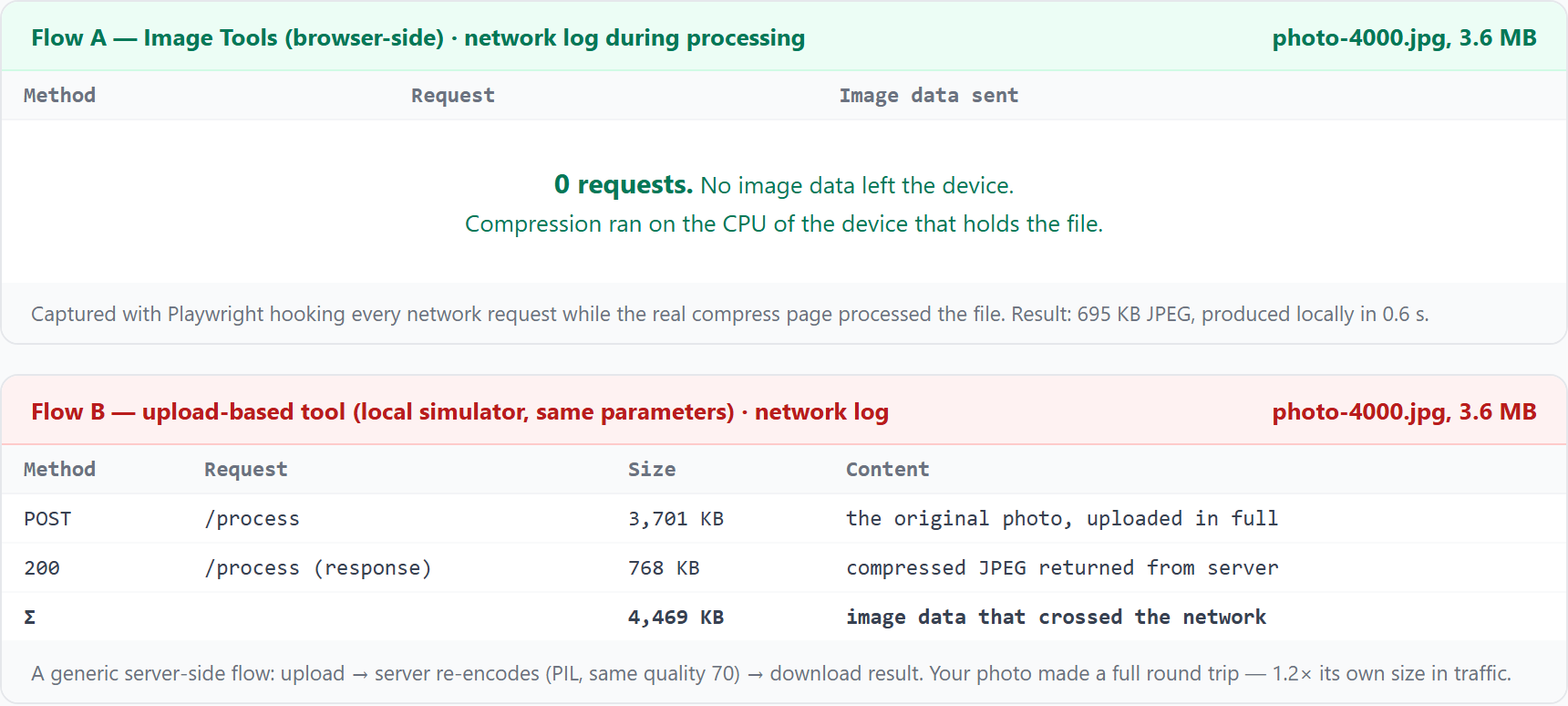
Two observations beyond the headline:
- The upload cost is paid on the full original. Flow B uploads all 3,701 KB of the large photo — compression happens after the most expensive transfer. The worse your connection, the more a server-side tool costs you before it does anything.
- Processing speed was comparable on loopback (A: 0.59 s including UI overhead; B: 0.50 s). The difference in the real world is the network: at a typical 10 Mbps upstream, uploading 3.6 MB adds ≈3 seconds one way, before processing even starts. On a mobile connection it's worse, and it's paid again for every image.
What This Means for Privacy
Byte counts are the measurable half. The structural difference is bigger:
- Copies: browser-side, 0 copies of your image leave the device. Upload-based, at least 1 full copy transits the network and exists on the server — in memory, caches, or logs — under someone else's control and subject to their retention policy.
- Attack surface: what a server receives, a server can leak, breach, or subpoena. Nothing received, nothing to lose.
- Verification asymmetry: a privacy policy is a promise; a network log is a measurement. In Study 04 we showed what a photo's metadata reveals — GPS coordinates down to a few meters. Deciding which architecture to trust with that is worth 30 seconds of evidence.
Verify Any Tool Yourself in 30 Seconds
You don't need our instrumentation. Every browser ships with the measurement device:
- Open the tool page, then press F12 → Network tab.
- Tick "Preserve log" (otherwise page activity can be hidden), and optionally filter by Fetch/XHR — image uploads travel over these.
- Feed the tool a file you don't mind sharing first, and watch: if a request appears with a size close to your file's size, or with a name like
upload/process/api, your image went to a server. - Now open our compression page in another tab, repeat, and watch the log stay empty while the result appears. On this site, the only requests you'll see during processing are none.
This test works on any tool, for any file type — it's the same evidence we collected above, available to you directly.
Limitations
- Flow B is a simulator of the upload pattern, not a specific third-party product. Real products pay strictly more network cost (TLS, queueing, possible CDN hops), so the comparison is conservative — but their processing parameters and retention behavior vary.
- All runs were on loopback; wall-clock times reflect local processing only. Real-world timing depends on upstream bandwidth and RTT, which is why we report bytes as the primary metric.
- Flow A's result (150.0 / 695.3 KB) differs slightly from Flow B's (155.9 / 767.6 KB) because the encoders differ (browser canvas vs Pillow) even at the same nominal quality — consistent with our Study 01 encoder measurements.
- Page-load costs were excluded for both architectures, as noted in the method.
Conclusions
- A browser-side tool moves zero image data over the network during processing — 0 requests, measured on a real page, not claimed on a marketing page.
- An upload-based flow moves at least 1.2× the file's own size (original up, result back), paid on the uncompressed original, on every image.
- Privacy here is architectural, not contractual. No upload step means no retention policy to trust, no server breach to worry about, no transfer to intercept. That's why we built this site the way we did — and why we'd rather show you the network log than ask for trust.
- Verify, don't trust — including us. The 30-second DevTools test above works on any tool. Run it once before processing anything you actually care about.
Try the Zero-Upload Architecture
Open DevTools first if you like — we'd consider it a compliment: